GitHub label triggers, any model in chat and Firefox tests
Start a rule from a GitHub label, pick any enabled model in the chat, and let agents test in Firefox and Safari's engine. Agent secrets are now write-only.
On this page 6 sections
In short
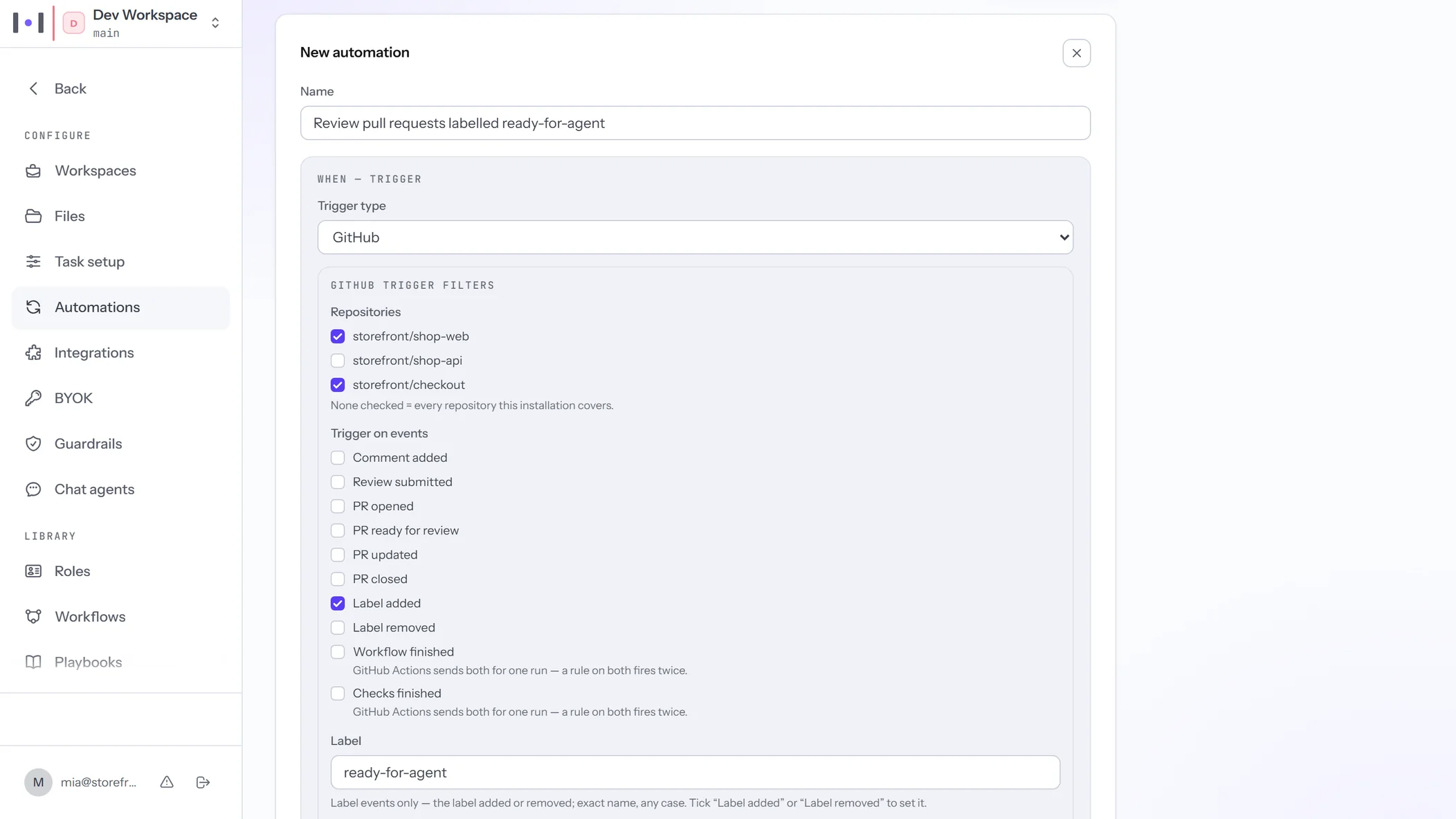
- GitHub label triggers: a label added to or removed from a pull request starts your rule, filtered by label and author.
- Any model in the chat: you pick any enabled model, on Kadmo or on your account's own key.
- Firefox and Safari tests: your agents run Playwright tests in Firefox and in WebKit, the engine behind Safari.
- Write-only secrets, a Linear key that reaches your agents, and content rules that judge only the message you send.
The fifth release was about what your agents can reach and what they can show. This one is about how their work starts and what it runs on: a label on a pull request starts a rule, the chat answers on any model you switch on, and agents test in two more browser engines. The app’s part reaches every account at once; an agent takes the two browsers when you add them.
Also new on kadmo.ai: Kadmo Bugbot, the playbooks that take a bug from its report to a verified fix, and playbooks for AI coding agents.
Start a rule from a GitHub label
A label added to or removed from a pull request starts your rule, filtered by label and author. On Automations, a GitHub rule now takes the events Label added and Label removed. Give it the label’s exact name, and say whose pull requests count: any author, your agents, not your agents, or one login.
Only a label that Kadmo’s own GitHub app set is skipped. A label set by GitHub Actions, by another app, by a person or by your connected GitHub identity starts the rule. So a CI job can hand a pull request to an agent by labelling it, and an agent working under your connected GitHub identity can hand it on the same way.
The job receives the label, the pull request’s other labels and its author, so a playbook can read why it started. Keep two rules from undoing each other’s labels: one that removes a label and one that adds it back would keep starting each other.
Any model in the chat
You pick any enabled model in the chat, on Kadmo or on your account’s own key. Until now an account that answered its chats on its own AI provider key had one model there, the connection’s. The model list in Ask and in a goal’s chat now has three groups: your favourites, the enabled models of your key under your provider’s name, and Kadmo’s models.
The group a model stands in says who answers and who pays. A model of your key runs on your key and spends no Kadmo credit. A Kadmo model spends Kadmo credit, under your plan’s locks. If your key refuses a call, the call is refused; it never moves to Kadmo’s credit by itself.
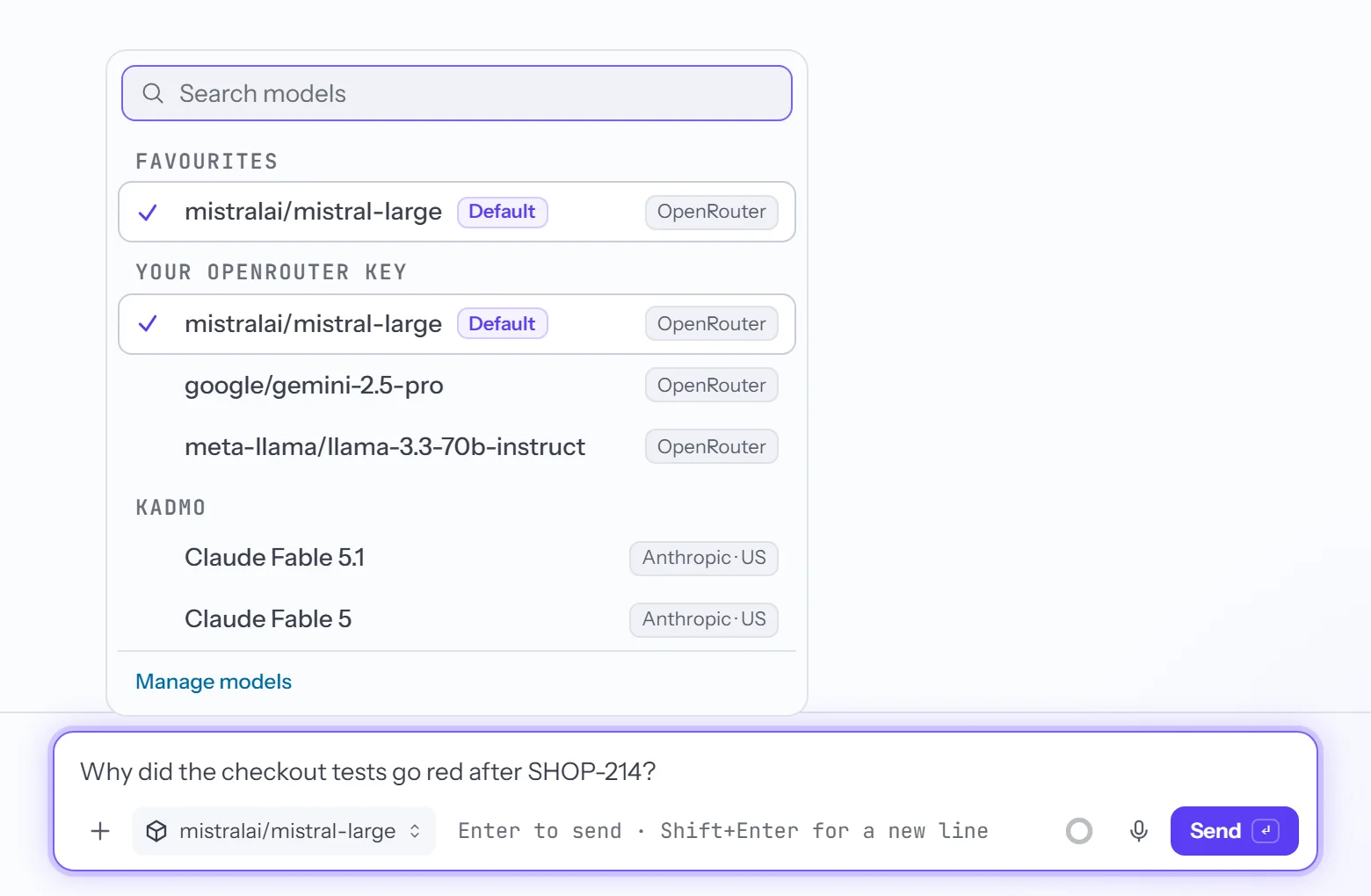
An admin decides what the list offers under Settings › Models, which now lists your provider’s models too, with a search and an Available switch for each. The connection’s own model is always on, and the others start off. Slack, Teams, chat agents and your agents’ jobs keep the account’s provider. An account on Kadmo’s provider alone sees no change.
Firefox and Safari for your agents’ tests
Your agents run Playwright tests in Firefox and in WebKit, the engine behind Safari, beside Chrome. The Create-Agent wizard, the Add dialog and an agent’s page list two more components, Firefox and Safari (WebKit). Each installs Playwright’s build of that browser with the system libraries it needs, for the agent’s own user, so a job runs npx playwright test in that engine without sudo.
WebKit is the engine Safari is built on, and here it runs on Linux. It is not Apple’s Safari on a Mac or an iPhone. It catches what Safari’s engine renders or runs differently from Chrome’s.
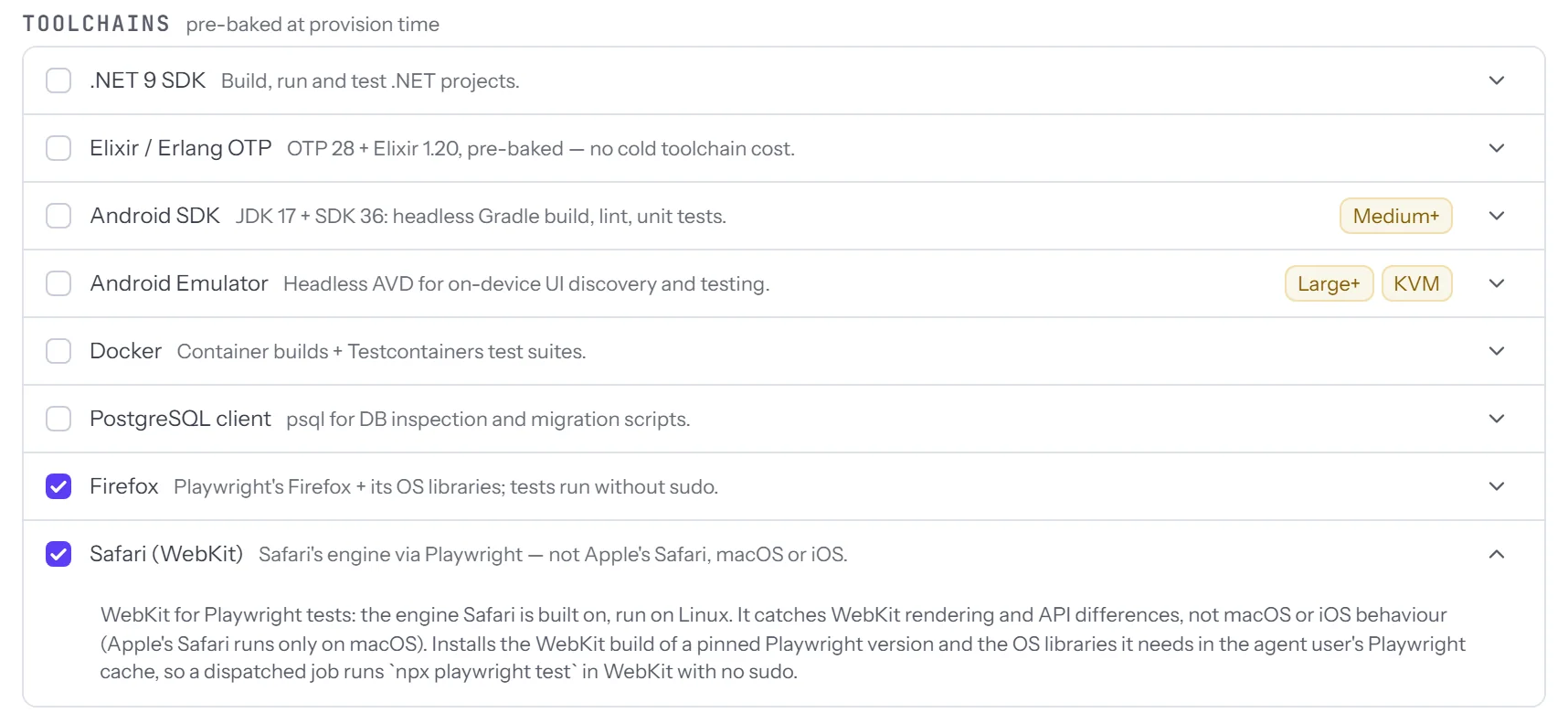
Adding a browser to a running agent restarts nothing; the agent installs it in its next update pass. The builds are those of Playwright 1.64.1. A repository on another Playwright version installs its own builds beside them, also without sudo.
Secrets you write and never read back
A secret saved in an agent’s environment never comes back to a browser, not even an admin’s. In Settings › Agents and on an agent’s page, a secret’s value now reads •••• set. The agent still gets the real value; the page and the API do not.
A name that holds PASS, KEY, TOKEN, SECRET or the like is always private, and an admin ticks any other name to make it private too. To change a secret, type its new value. A save changes only the names you changed and leaves every other value as it was.
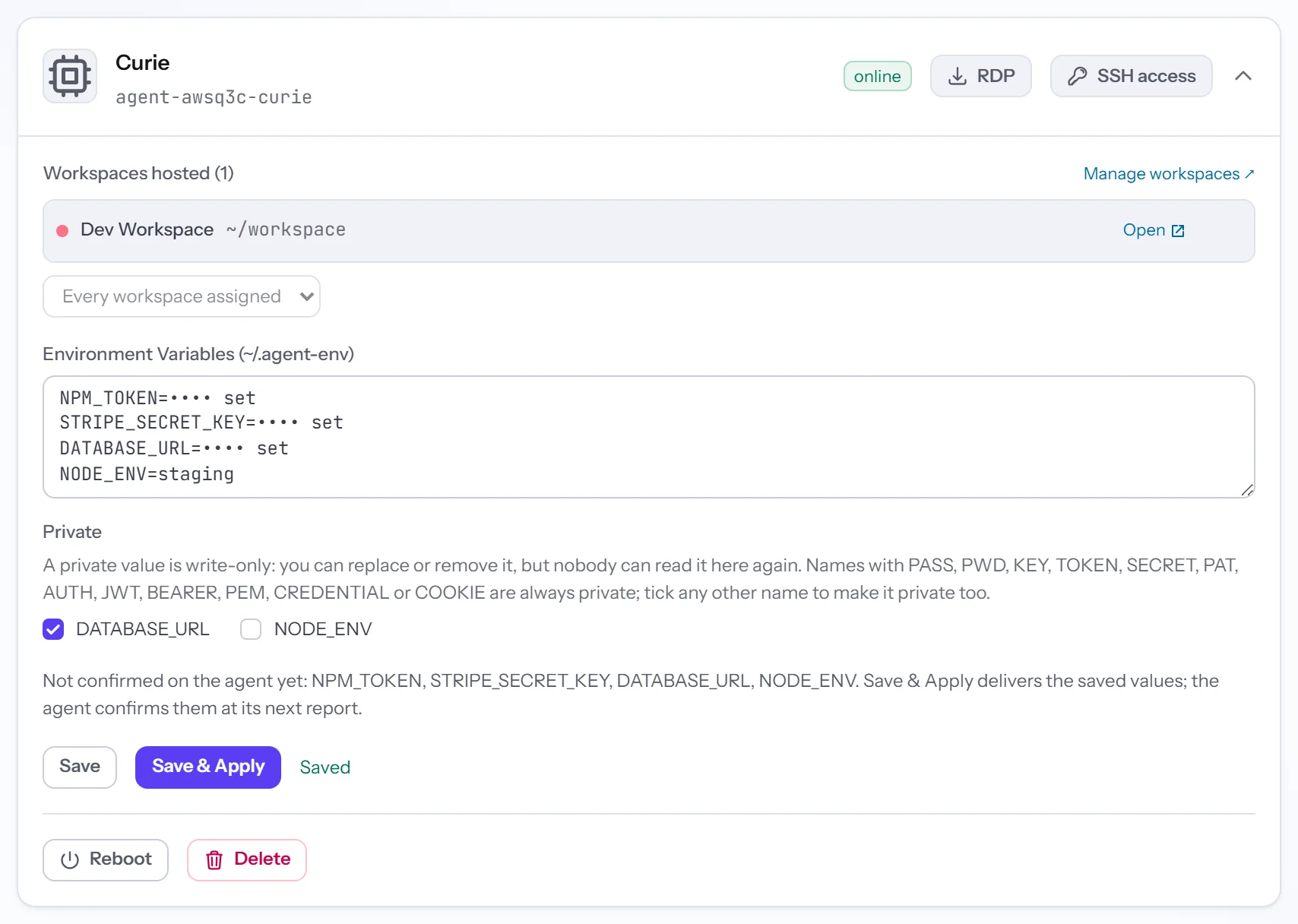
Saves are stricter, so nothing is lost without a word. A line that is neither NAME=value nor a comment is refused, with the line named, and so is an empty value over a secret that is set. Comments are no longer kept in the box: keep such notes somewhere else before you save.
Linear: your key reaches your agents
Your Linear personal key reaches your agents, and goals load however large the Linear project is. If you connected Linear with a personal API key, Kadmo now gives that key to your account’s agents and sets up Linear’s MCP server beside it. You no longer add LINEAR_API_KEY to each agent by hand, and a key you did add by hand is left alone. Disconnecting Linear takes both away again, and the confirmation names the agents.
Large Linear projects had started to fail with Query too complex. Linear prices every query before it runs it and refuses one above 10,000 points. Kadmo now reads in pages that stay under that limit: in Goals, in the import picker, in an epic’s tickets and in search.
One goal that Linear will not read no longer takes the others down with it. That goal is shown as unreadable, with Linear’s reason, and the rest of the list loads.
Also in this release
Action needed
- Agents created before 3 November: run Self Update. It brings the fix for Chrome: when someone closes it, Chrome comes back by itself, and an agent whose Chrome is already down recovers.
- Firefox and Safari (WebKit) on an agent that has never taken a Self Update: run Self Update first, then add the component on the agent’s page.
- Notes in an agent’s Environment box: a comment is dropped at the next save, so keep such notes somewhere else.
Improved
- Content rules judge only the message you are sending, with its attachments. A key pasted once is one finding, and under Block an old message no longer refuses the rest of its thread.
- Findings from Ask now count on their workspace’s Guardrails page.
- Reset to default for AGENTS.md and
.mcp.json, in the workspace editor and in Files. The default AGENTS.md now describes a Kadmo agent. - A skill takes its name from its
SKILL.md, a folder can be picked or dropped, and a stalled upload names its file and frees the page. - An install of the Kadmo AI app that starts on GitHub lands on a setup page: sign in or sign up, then confirm which Kadmo account it joins.
- On an account that never connected an AI provider, the Slack and Teams row reads No AI provider connected, with Connect.
- From an AI client, the 50 tools of the Kadmo MCP describe what they do in plain words.