AI code review that fixes what it finds
Kadmo Bugbot is a set of playbooks that reviews every pull request on its branch, tests every release on the live site and takes a bug from the report to a verified fix.
- 92.5 % of agent pull requests pass human review without rework
- Commits on the branch instead of comments on a diff, with CI run before the merge
- Live QA in a browser on the deployed site, after a merge
Catch it at the cheapest door
A bug caught in review costs minutes. The same bug found by a user costs a release, and in production it costs someone’s night. Kadmo Bugbot puts a playbook at each door: a rule on your pull requests, a pass on what is deployed, a run on every new bug.
Every lane works a ticket, and the ticket keeps the record: each step’s report, its verdict, and who decided what. Of the pull requests Kadmo’s agents open, 92.5 percent pass human review without rework.
Every pull request reviewed, on its branch
A rule on the Kadmo app for GitHub starts the review when a pull request opens or changes: from people, from your agents or from both, in the repositories you pick, or only on a mention or a label from a collaborator.
The reviewer checks the branch out on its own machine, reads the ticket, fixes what it finds, runs CI and reports on the ticket. Its changes are commits, not suggestions. A QA agent reads the same pull request against the acceptance criteria.
The merge stays yours, or the playbook merges and holds on a conflict or a failed CI.
Playbook · Pull request review
Tested on the live site, where your users are
Review reads the code. The QA pass uses the product: an agent clicks through an area of the deployed site in a browser of its own, across sessions, and posts every finding on the epic as it goes.
Consolidation merges the findings by root cause, proposes the tickets and files them on your yes. After a merge, a regression test runs on the deployed site ten minutes later, or from your CI the moment a workflow finishes.
Ask for a screen recording, and a finding comes with the video of what the agent saw.
Playbook · QA pass
From bug report to verified fix, in one run
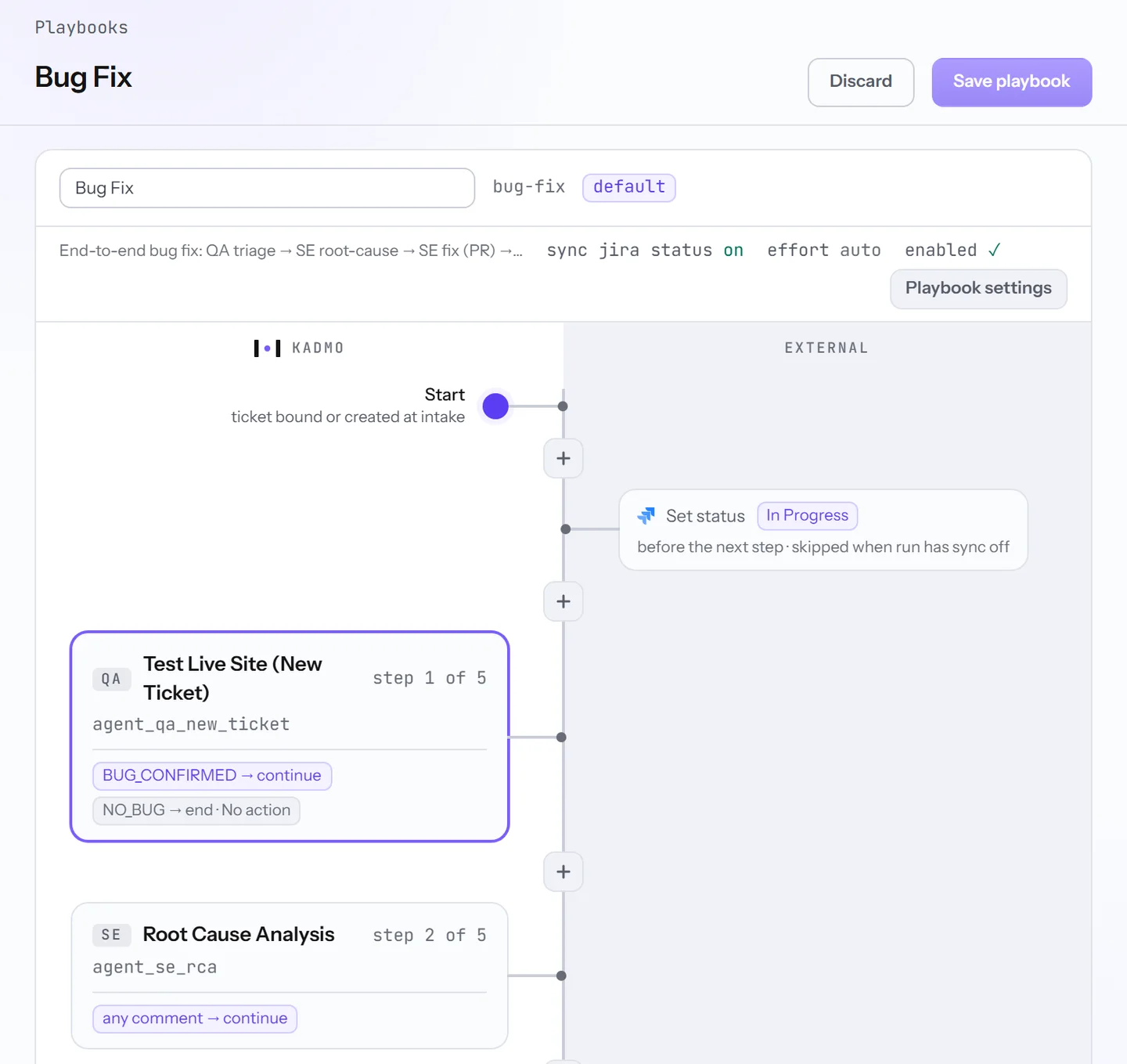
Bug Fix is five agent steps, each ending in a verdict a gate reads: reproduce on the live site, trace the root cause, fix and open the pull request, merge, retest after the deploy.
A report that cannot be reproduced ends the run without a pull request. A failed retest stops it for a person. Once the ticket is done, Validate resolution checks the repository against what the ticket asked for.
It starts the way your team already files bugs: a rule on new bugs, the issue type, @kadmo on the ticket, a message in Slack or Teams, or a Sentry error turned into a ticket with its evidence. Hotfix skips triage and regression for the urgent ones.
Playbook · Bug fix
A reviewer that knows your product
A reviewer is as good as what it knows. Skill Discovery sends an agent through your repositories and your product and writes what it finds into your skill pack, module by module, each with a confidence figure.
The pack is your git repository, reviewed like code. A readiness figure per area says where QA, engineering and planning jobs make sense. Set a target confidence and Kadmo keeps discovering until it is reached.
Playbook · Skill discovery
Beside a reviewer on the diff
Cursor’s Bugbot and GitHub’s Copilot code review comment on the lines of a diff, and the fix is yours to make or to accept. When a second pair of eyes is the bottleneck, that is the right tool. Kadmo Bugbot starts at the same pull request and keeps going.
| A reviewer on the diff | Kadmo Bugbot | |
|---|---|---|
| The review | Comments on the lines | Commits on the branch, CI run before anyone merges |
| The test | The diff | The deployed product, in a browser |
| After the fix | Your editor | A regression test on the live site, the resolution validated |
| What it knows | A rules file | Your skill pack, with a readiness figure per area |
| Where it runs | The vendor’s machines | Kadmo’s machines, your cloud account or your own |
You choose the model for each step and set a budget with a ceiling.
How it starts
The first step is a call. In 30 minutes we go through how your team reviews and tests today and choose the repositories for a pilot. The pilot runs on your own pull requests and bugs, on the machines you pick. What it costs follows from the plan you run it on, and the pricing page lists the plans.
- Call · you and KadmoYour review and QA setup, walked through and scoped30 minutes
- Pilot · the agentsReviews on your pull requests, a QA pass on your site, bugs fixed end to endYour tickets
- Decide · youWhat the reviews caught and what each fix cost, on the ticketsYour call
- Rollout · your teamThe rule on every repository, agents on the machines you chooseRunning
Set it up
One rule under Automations starts it: a GitHub trigger on opened and updated pull requests that runs the review workflow or your own playbook. Route your QA issue type to QA Pass, add a rule for when CI finishes, send bugs to Bug Fix by issue type routing, and start Skill Discovery from Capabilities › Skills. A screen recording is one tick when you start the run.
Questions
Does Kadmo Bugbot need Jira?
No. It works the ticket where your team keeps it: Jira, Linear, Notion, or Kadmo's own tracker when none is connected. A GitHub rule works the ticket named in the pull request's description.
Which git hosts start a review?
The rules listen to the Kadmo app on GitHub. The agents work on GitHub, GitLab, Bitbucket and Kadmo Git, and a merge gate checks the pull request on whichever host holds it.
Does it review the pull requests my own agents open?
Yes. The rule's author filter picks every author, people only, your agents only or one login. A bot's own comment never starts the rule again, so a reviewer cannot set itself off.
Does it merge on its own?
Only where the playbook says so. The review step without a merge stops at ready to merge and leaves it to you. Review + Merge merges, and a conflict or a failed CI holds the run for a person.
What does the reviewer know about our code?
Your account's skill pack: the modules Skill Discovery wrote, the role guides your team added, your Claude Code skills. An area without a module is read from the repository alone, and the Skills page says so before you start.
Where does the code run?
On the agent's own machine: Kadmo's, one in your cloud account, or your own on Ubuntu, Docker or Kubernetes with one outbound connection. The branch is checked out there and nowhere else.
Put it on the next bug your team files.
Book a meeting, and we set up the review on one of your repositories with you.