Skip to content

A ChatGPT alternative for your whole software team.

Product has a question about a feature. Engineering needs the background to a bug. QA wants to understand what changed. Kadmo gives these colleagues one account for AI access, with supported models from different providers and answers they can share with each other.

Keep using GPT where it works for you, and choose Claude for another question. Your team’s workspace does not have to belong to the company that makes the model.
A dark tile with the OpenAI mark, GPT models, leads by a violet arrow into a Kadmo card, One team, shared AI, with three people at its foot.

Bring product, engineering and QA into one account.

Consider a product manager asking what is holding up the next release. They bring the release ticket into a Kadmo conversation, ask for an explanation and share the thread with an engineer. The engineer can read the question, the answer and its sources before deciding what needs attention.

The product manager needs an explanation, the engineer needs a place to investigate and QA needs to know which behavior to check. Each can use AI in the context of the same software, without having the same job.

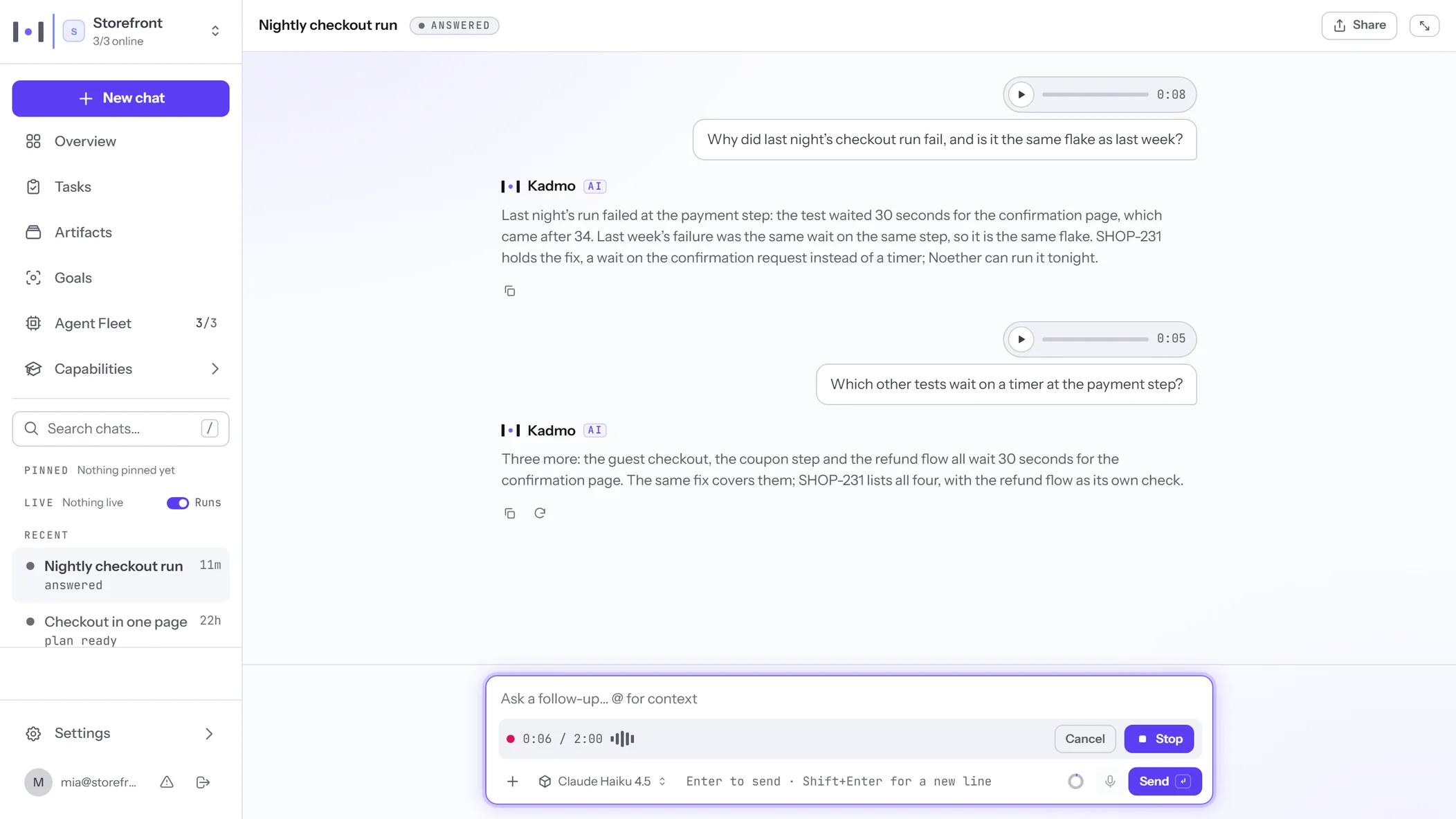
An Ask thread in the Kadmo app, Nightly checkout run, answered: two questions spoken as voice notes with Kadmo’s answers under them, Share at the head of the thread, and the box below with Claude Haiku 4.5 picked as its model and @ for context.

Let colleagues choose from your approved models.

An admin enables the models the account offers and sets its default. Members choose among the supported models available to them when starting their work. Someone trying AI for the first time has a starting point; an experienced colleague has room to choose.

ChatGPT already offers team and project capabilities. Kadmo gives your software team access to models from different providers within the account. A colleague can use GPT for one question and Claude for another, without arranging separate access to each service.

Share the answer with the people who need it.

A Kadmo thread belongs to the member who created it. Sharing gives signed-in colleagues in the same account a read-only view. It does not publish the conversation or turn it into a thread everyone can edit.

For the release question, the product manager can send the engineer the thread. The question and the evidence behind the answer travel together, ready for the engineer to inspect.

Ask where your team already talks.

Ask in a Jira comment, Slack channel or Teams chat through the integration your team has connected. Colleagues can begin where they are already discussing the work, with Kadmo’s account context behind the request.

Choose the entry point that fits the team. A question on a ticket belongs beside that ticket; a shared channel may be the right place for a discussion. Kadmo’s MCP server connects supported clients to your account.

Let occasional users participate.

Some colleagues will ask questions throughout the day. Others may need help only during a release or an unfamiliar investigation. Kadmo’s workspace pricing includes unlimited seats, with model usage charged separately.

You can invite the people who need access, then assess the workspace charge and the usage they generate. Compare that estimate with your present costs using the current pricing details, including the colleagues who will participate only occasionally.

When a personal assistant is enough.

If you mainly need help with your own drafting, research or a specialist ChatGPT workflow that already suits you, a personal assistant may cover the need. Keep the tools that serve that work well.

Kadmo is built around people who develop software together. Consider it when you want more colleagues to participate, need to share useful answers and want model choice within the same team workspace.

Two neighbouring pages take the next decisions: the Claude alternative for decisions that rest on project sources, and the Codex alternative for engineering work your team wants to delegate.

Start with one team and one real question.

Begin with something your colleagues already need answered. Invite a small group when your trial opens, ask the question and share the resulting thread. Check whether another person can understand it and use it in their next decision.

Join the waitlist through the trial page. Start with that small group, see what they find useful and decide who else should take part.

Questions.

Can one department begin before the rest of the company?

Yes. Start with the colleagues involved in a useful piece of work. Agree who administers the account and which models to make available, then assess the experience before inviting a wider group.

Can we continue using ChatGPT alongside Kadmo?

Yes. Your team can retain ChatGPT for workflows it already serves well. Evaluating Kadmo does not require moving every conversation or changing everyone’s preferred tool at once.

What if an answer leads to engineering work?

Kadmo can answer a request for work with a reviewable plan. Press Start when you are ready to create the work. If coordinating that work is your main need, the Codex alternative page follows the delivery process.

Bring your team’s next question to Kadmo.

Give product, engineering and QA a shared place to ask, choose their models and pass useful answers to each other.