Platform Guardrails
AI guardrails
Guardrails gather every limit on the model calls made through Kadmo on one page. Content rules read what your chats send before a model sees it. Budgets, regions, the models switched on and the call rate hold for every lane, agent jobs included.

On this page 8 sections
Content rules
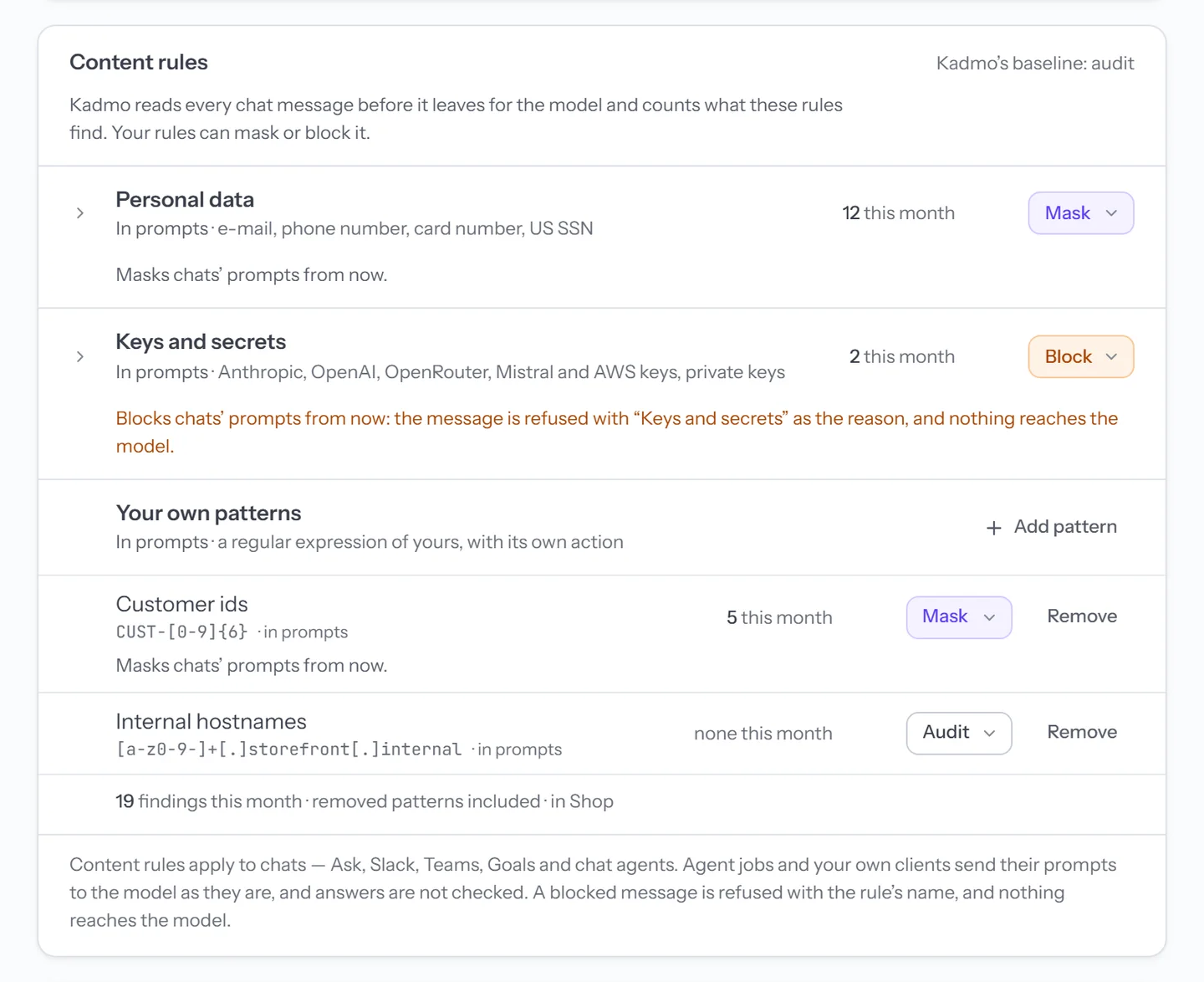
A chat’s message passes through Kadmo before any LLM sees it, and that is where these rules run. Two groups come with every account: Personal data, such as e-mail addresses, phone numbers and card numbers, and Keys and secrets, such as Anthropic, OpenAI and AWS keys. You can add regular expressions of your own for what only your company knows, like customer ids or internal hostnames.
Each group and each pattern does one of three things:
| Action | What happens to a match |
|---|---|
| Audit | It is counted, and the message goes on unchanged. Every account starts here. |
| Mask | It is swapped for a token such as <EMAIL> or <API_KEY>, and the rest of the message goes on. |
| Block | The message stops there, the chat names the rule, and no model sees it. |
Content rules cover chats: Ask Kadmo, Slack, Microsoft Teams, Goals and chat agents. Agent jobs and members’ own clients send prompts as they are. Inside a chat, the rules read the text going out and nothing else, so answers, attachments, images and tool results stay unread. A count keeps the rule and how often it matched, never the words.
Budgets
A budget is a spending limit under your Kadmo credit, for the whole account or for one workspace, by the month or in total. When a scope reaches it, new work there waits, and a running job pauses once what it set aside is spent. Admins hear about it earlier too, at 80 % and again at the limit.
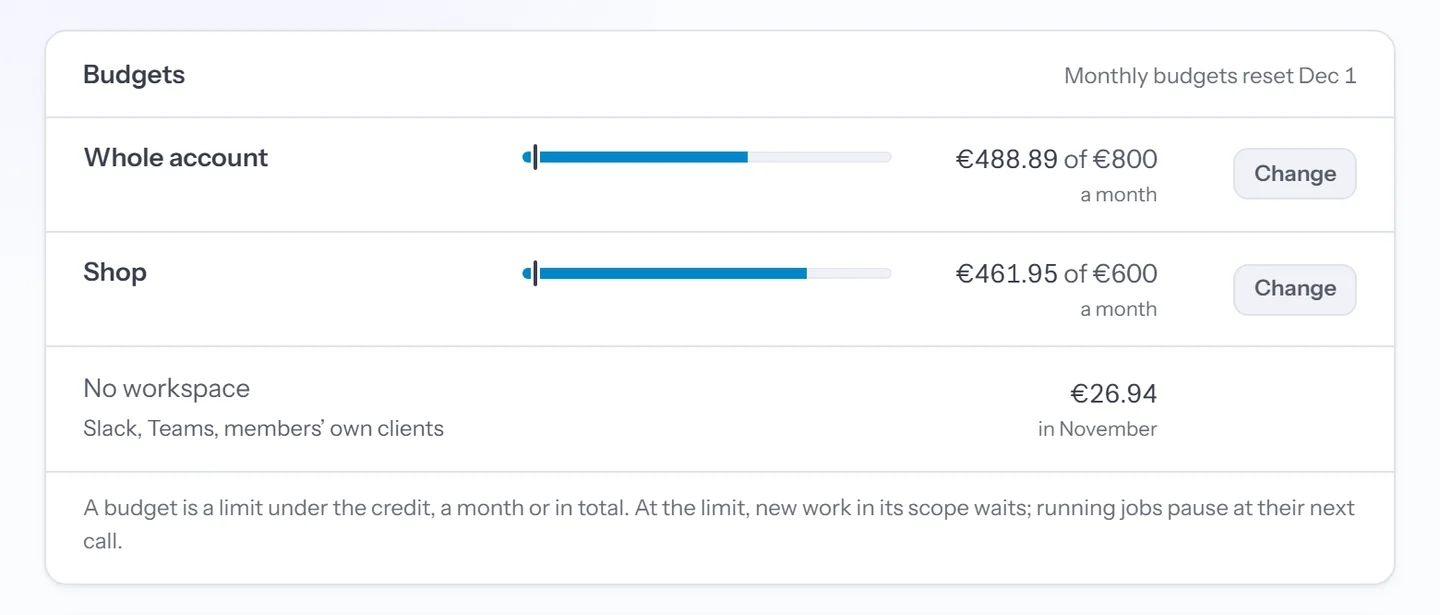
Spend outside any workspace, from Slack, Teams or a member’s own client, meets the account’s budget alone.
Data residency
Data residency says where your models may run. It has three boxes, EU, US and Global, on one row for the whole account and one for each workspace. A workspace can narrow the account’s choice and never widen it.
Kadmo checks this before a call goes out, whichever lane it came from, and a model outside the regions is refused with the reason and the way out:
This workspace allows EU models only; claude-sonnet-5 runs in the US. Pick a model served in the EU, or change the workspace's AI regions on Guardrails.Each row also counts the models a call there may still pick: served in its regions, part of your plan and switched on. Read which model runs where on the pricing page before you narrow one.
Models
An admin decides which models the account has on, and which one is the default. Members choose from those. A model that is off is refused on every lane, an agent pinned to it included, and the refusal says what to do instead.
Call rate
This is the one part you read and do not set: Kadmo’s own ceiling, for each key and for all callers together, there so one runaway caller cannot crowd out the rest. A call that goes over waits its turn and tries again.

Questions
Do content rules cover our agents' jobs?
No. They cover chats: Ask Kadmo, Slack, Microsoft Teams, Goals and chat agents. An agent's job and a member's own client, such as Claude Code, pass their prompts along untouched.
Do the rules read what a model answers?
No. They read the text a chat sends, and nothing that comes back. Attachments, images and tool results go out unread too.
Will content rules stop a prompt injection?
No. They look for personal data, keys and secrets, and the patterns you write, so a message that only talks a model into something matches none of them.
Do budgets count calls on our own keys?
No. A budget sits under your Kadmo credit, and a call on your own key draws nothing from that credit.
Set it up
The Guardrails guide covers content rules, budgets, data residency, the models' switch and the call rate.
-
Models and keys
A model per step, on your Kadmo credit or your own keys, with no lock in.
-
Self-hosted agents
Inside your perimeter: one outbound connection and no inbound port, on Ubuntu, Docker or Kubernetes.
-
Reporting
The report on the ticket, the notice in your chat, and a video of the job when you ask.