Skip to content

A Claude Code alternative to maintaining every agent setup yourself.

Kadmo can use Claude Code as the coding engine while supplying the environment, maintained process content and operational view around it. Run agents as part of your team’s engineering operation.

A Kadmo card, Team skills, holds a violet package; a violet arrow leads from it to a dark Claude Code tile, Agents + developers.

Use Claude Code without maintaining every setup.

A coding agent needs repository access, tools, project instructions and a way to explain why a job stopped. Kadmo brings those concerns into the team’s account. You decide what the agent may work on and what counts as acceptable work. Kadmo provides a place to configure the agent, assign its workspace and follow its jobs, so the setup serves the team beyond an individual developer’s session.

Choose the machine separately from the model.

The coding runtime executes commands and works with repository files. The model endpoint supplies inference. Choose the environment for repository access and a supported model route for the work. Kadmo supports Claude Code and Claude Code with Claude Code Router for Anthropic; for OpenAI, it supports Claude Code with Claude Code Router and Codex. The Anthropic and OpenAI pages explain those provider choices.

Put the agent where it can reach the repository.

Choose the environment around access to your code, build tools and internal services. Kadmo-hosted agents offer a managed starting point. Supported customer-cloud and own-machine options let the runtime work within an environment your team operates. The right choice depends on the repository’s network needs and the responsibilities you want to retain. Running commands on your machine and sending a request to a model provider are separate parts of that decision.

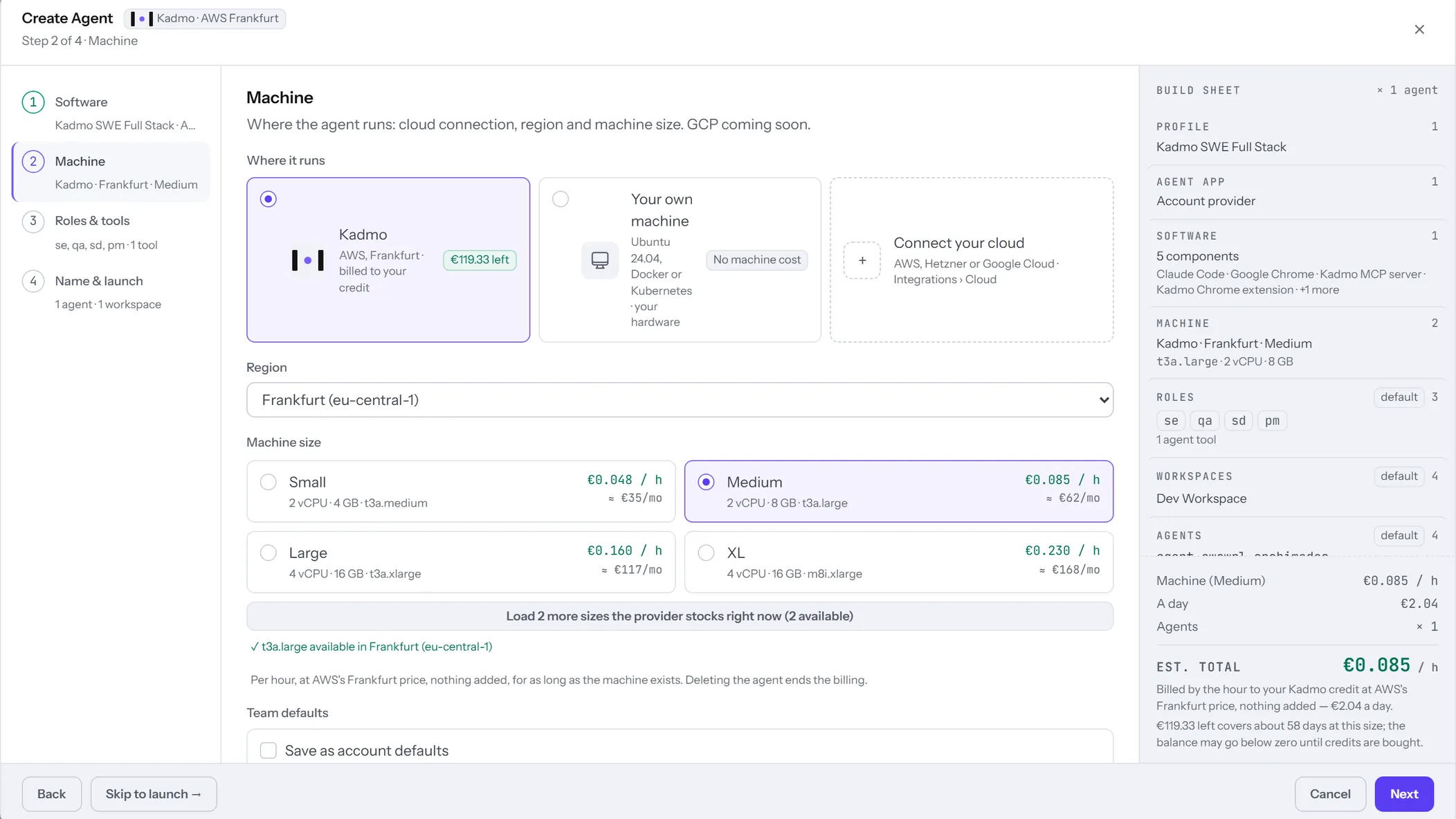
The Create Agent wizard in the Kadmo app on its Machine step: where the agent runs, a Kadmo machine in Frankfurt billed to the credit, your own machine at no machine cost, or a connected cloud; the region; and four machine sizes with their prices an hour.

Start with a maintained playbook.

For a bug fix, the team needs more than a request to edit code. It needs a process for understanding the issue, implementing the change and checking the result. Kadmo supplies playbooks with roles, instructions and checks already prepared. Start with that process and inspect how it fits a representative task. When the team needs a different sequence or rule, duplicate a built-in playbook and maintain an account-owned version.

Keep your team’s changes under your control.

Maintain project knowledge in the account’s skill pack and distribute reusable Claude Code instructions through the account marketplace. These serve different purposes: the pack supplies knowledge to the agent runtime; the marketplace installs Claude Code skills. Keep a workspace-specific skill local to that workspace, and promote it when the wider team should use it. A lesson from a run becomes shared guidance through a deliberate change your team can inspect.

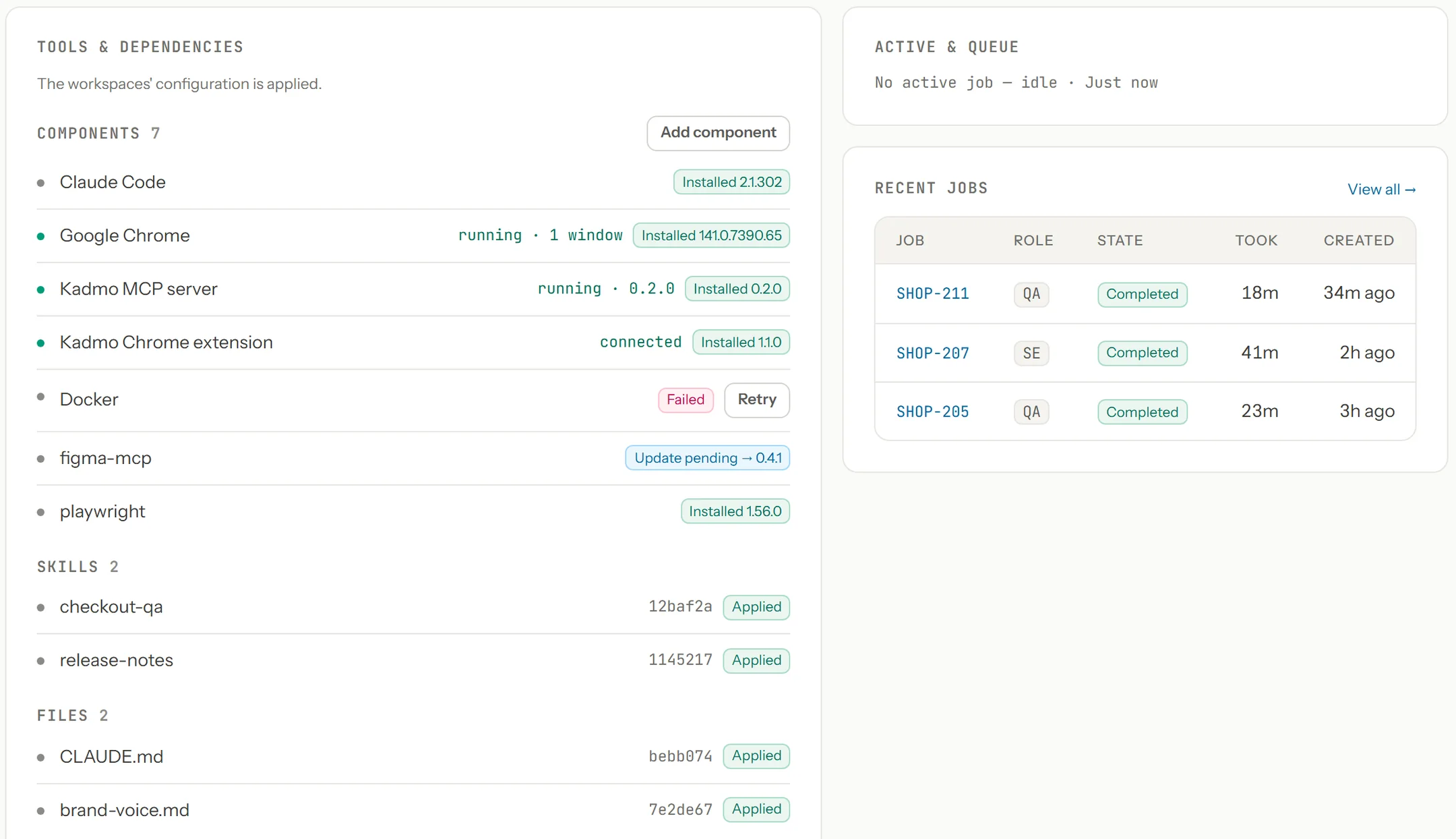
An agent’s page in the Kadmo app, Tools and dependencies: seven components with their versions, Claude Code installed, Docker failed with Retry, an update pending for figma-mcp, two skills and two files applied, and the agent’s recent jobs beside them.

Give colleagues and agents the same working tools.

Your account’s Claude Code skills marketplace

Kadmo Git · Claude Code plugins

Every Kadmo account has a Claude Code skills marketplace on Kadmo Git. Admins edit skills in the app; account members can contribute through git. With deployment enabled, managed Claude Code agents install the released skills and receive updates when available, with busy agents updating after their job ends. Colleagues can connect their own Claude Code to the same marketplace. A release-note skill or review procedure can then reach both managed Claude Code agents and developers’ local sessions. Versioned releases and installation status help the team see which instructions have arrived.

Your company’s MCP server

Built and hosted by Kadmo · Your repository

Bring your company’s own tools in a supported MCP server project. An Admin attaches its repository in Kadmo and chooses whether members or only Admins may connect. Kadmo builds and hosts the server, then redeploys it when changes land on its configured branch. Colleagues connect from compatible clients using their Kadmo account sign-in. Your server receives the caller’s identity, without receiving their Kadmo token, so your tools can apply the appropriate permissions. Your team owns the tools; Kadmo operates their deployment.

Inspect a stopped job before starting another.

Open the job’s state and transcript to find the point where progress stopped. A missing credential needs a different response from an unclear requirement or a failed check. Use that evidence to fix the environment, revise the request or involve a colleague before deciding how work should continue. For coordination across dependent tickets, the Codex alternative page follows the larger delivery process.

When a direct installation is enough.

A developer who works interactively and is comfortable maintaining the local environment may prefer a direct Claude Code installation. Kadmo is useful when operating agents has become a shared responsibility: several environments, common instructions and jobs that colleagues need to inspect.

Questions about agent operation.

Can local developers use the company skills?

Yes. Members can connect their own Claude Code to the account marketplace and install its plugin using their personal Kadmo Git access.

Do skills updates interrupt a running Claude Code job?

Busy Claude Code agents receive a released marketplace update after their job ends. Idle Claude Code agents can receive it immediately while deployment is enabled.

What if a company MCP server deployment fails?

The existing live copy keeps serving. Admins can inspect the failed deployment’s build log and correct the change before another deployment replaces it.

Run one existing playbook on one real task.

Choose a suitable environment and a representative bug fix. Assess the setup effort, the job’s evidence and the responsibilities your team retains.