Skip to content

An Anthropic alternative with provider choice under your control.

Claude can remain part of your team’s work without becoming its only model family. Kadmo separates the work platform from the supported providers that serve it, giving your organization a place to manage provider connections, model availability and data rules.

Choose which services the team may use, under whose credentials and within which permitted regions. Keep those decisions explicit as your work and providers change.

A dark Anthropic tile leads by a violet arrow into a Kadmo card, Approved route, with a violet location pin at its foot.

Separate the model maker, the host and the work platform.

Three decisions sit behind a model request. A company makes the model. A service hosts its inference. A work platform supplies the context, instructions and process around the call.

Accessing Claude through another cloud changes the hosting relationship while retaining Anthropic’s model family. Kadmo adds the ability to use supported models from other makers within the same work platform. Decide which kind of choice your organization needs, then assess the actual route a request will take.

Agent setups for Anthropic.

Claude Code

Anthropic models · Native coding CLI

Run Claude Code directly with Anthropic models as a Kadmo agent. Use the native coding CLI within the roles and processes your team assigns, with the job’s progress and results available in Kadmo. This is the straightforward option when you want Claude Code connected to Anthropic.

Claude Code with Claude Code Router

Anthropic models · Routed coding CLI

Connect Claude Code to Anthropic through Claude Code Router. Choose this arrangement when your agent setup uses the router to handle its model connection while keeping Claude Code as the coding CLI. Kadmo supports this alongside the direct Claude Code option.

Name the destinations each workspace may use.

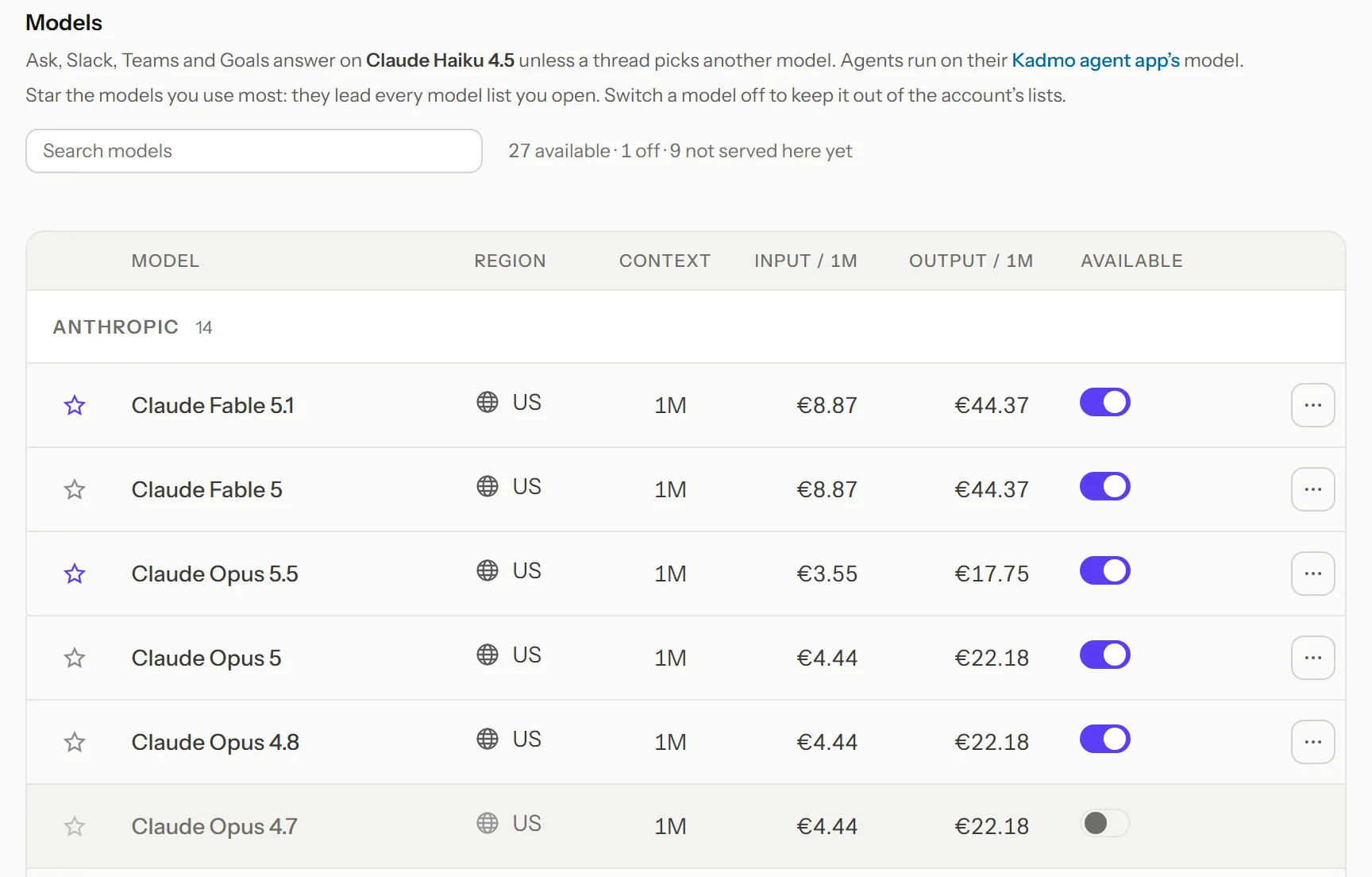
An admin chooses the account’s available models. Model entries show where inference is served, so the team can distinguish the location of the Kadmo app from the destination of a model request.

With Business and up, regional policy can narrow the permitted destinations for the account and its workspaces. A call outside the applicable regions is refused with a reason. An EU-only policy can use only enabled models served there; if none meet the policy, it leaves no eligible route. The policy enforces the destination you permit.

Settings › Models in the Kadmo app: the default model named above the table, then each model with the region it is served from, its context window and its prices per million tokens, and the switch that makes it available to the account.

Choose whose provider account serves the work.

Kadmo-supplied model access uses the account’s Kadmo credit. With Enterprise, you can connect your own provider keys or use supported gateway and provider arrangements. Calls using your own credentials belong to that provider billing relationship.

The account’s provider supplies the default, while an agent’s configured app or a run’s explicit choice can determine its own connection. Make those assignments deliberate so the team understands which provider serves a job. The coding CLI and the source of model access are separate parts of the setup.

A failed customer key stops the call.

If your chosen provider key cannot serve a request, the request is refused with the reason and the action needed. Kadmo does not silently switch that failed own-key request to its prepaid model credit.

That behavior keeps the supplier and payer you selected explicit during failure. An administrator can repair the connection or intentionally choose another supported arrangement.

Decide what leaves in a chat message.

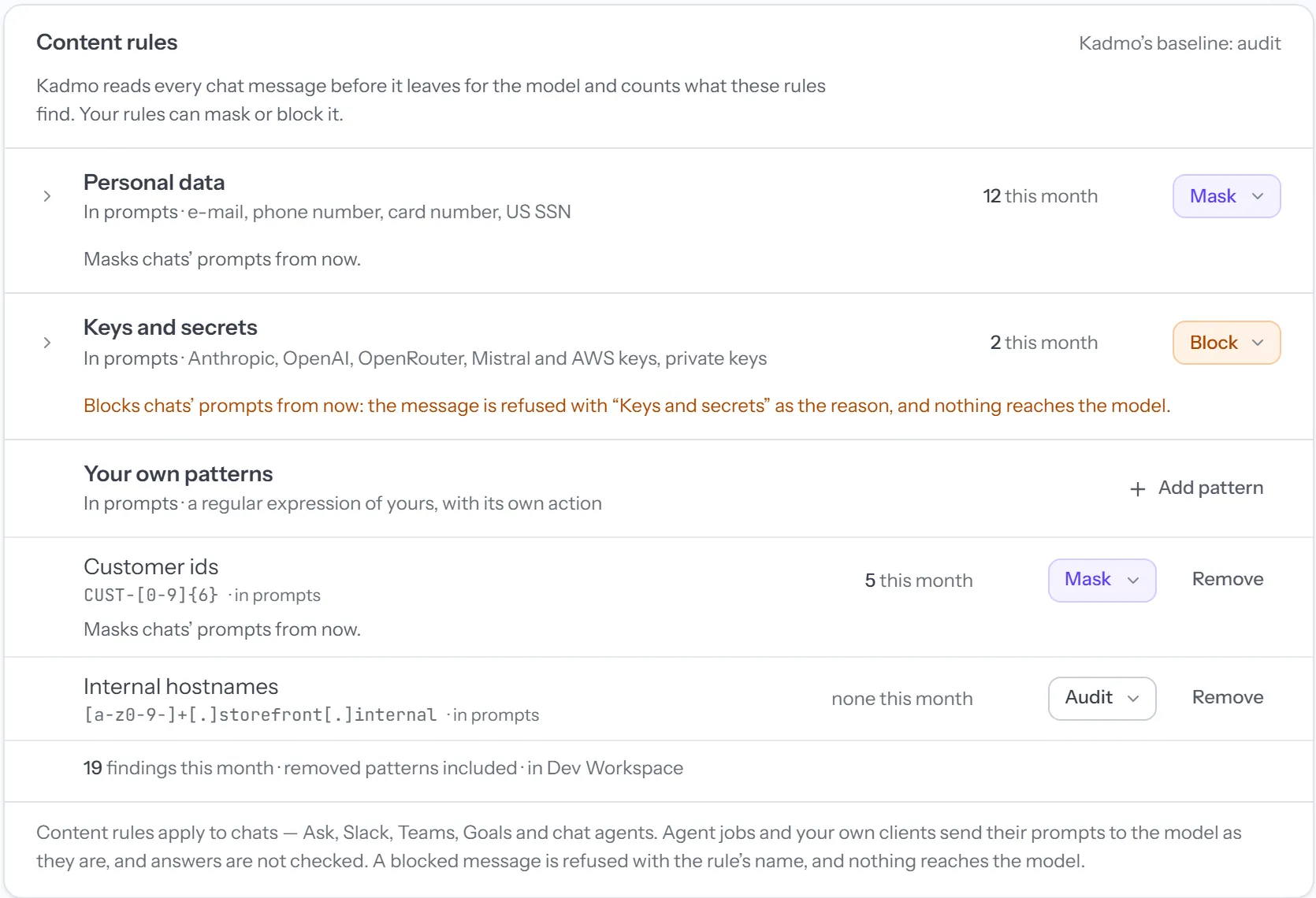
Content rules give admins on Business and up three responses to matched chat content: audit it, mask it or block the message. For example, a rule can replace a detected email address before a message is sent, or refuse a message containing a detected API key. The account can add patterns for its own identifiers.

These rules cover outbound chat messages in the supported Kadmo chat surfaces. They do not inspect attachments, tool results, model answers, agent-job prompts or a member’s external-client calls. Use their actual coverage when deciding which work and data belong in a given route.

Guardrails › Content rules in the Kadmo app: personal data set to Mask and keys and secrets set to Block, each with what it found this month, the sentence that a blocked message is refused and nothing reaches the model, and two patterns of the account’s own.

Know which party handles each part of the work.

Kadmo operates the workspace and coordination service. The selected model service processes the request it receives. Your agent environment and any connected tools are additional parts of the data flow. App hosting, code execution and model inference therefore need separate answers in a procurement review.

Review the processors, training treatment, retention and deletion terms for the services in your chosen arrangement. Kadmo’s privacy policy names its processing relationships; Enterprise arrangements include the data processing agreement and contractual review your procurement requires. A model or region setting supports those decisions and should be assessed alongside the applicable agreement.
When a direct Anthropic relationship is simpler.

If a single Anthropic service covers your workload and its direct agreement meets your requirements, using it directly may be the shorter path. Kadmo fits an organization that also wants its work platform and operating rules to accommodate other supported providers.

For choosing models by quality and cost within a workflow, see the OpenAI alternative. For project questions and reusable knowledge, see the Claude alternative.

Questions about provider control.

Do we have to stop using Claude?

No. Retain Claude for suitable work and add another supported model where your organization approves it. The benefit is keeping the provider decision available as requirements change.

Does hosting an agent ourselves make inference local?

No. An agent can run on your machine while sending model requests to a remote inference service. Assess its configured model route separately from where the repository and coding process run.

Can a workspace allow fewer regions than the account?

Yes. A workspace can narrow the account’s permitted regions. It cannot make a region available that the account disallows, and its eligible models must also be enabled and included in the plan.

Who can change these settings?

Admins manage the provider connections, approved models and applicable guardrails. Members can inspect the available settings and use the models and tools their account permits.

Approve one route before a wider rollout.

Choose a representative piece of work and agree its permitted destination, credential owner, data handling and approval conditions. Run it through the proposed arrangement and review the evidence with the people responsible for your platform and data.